
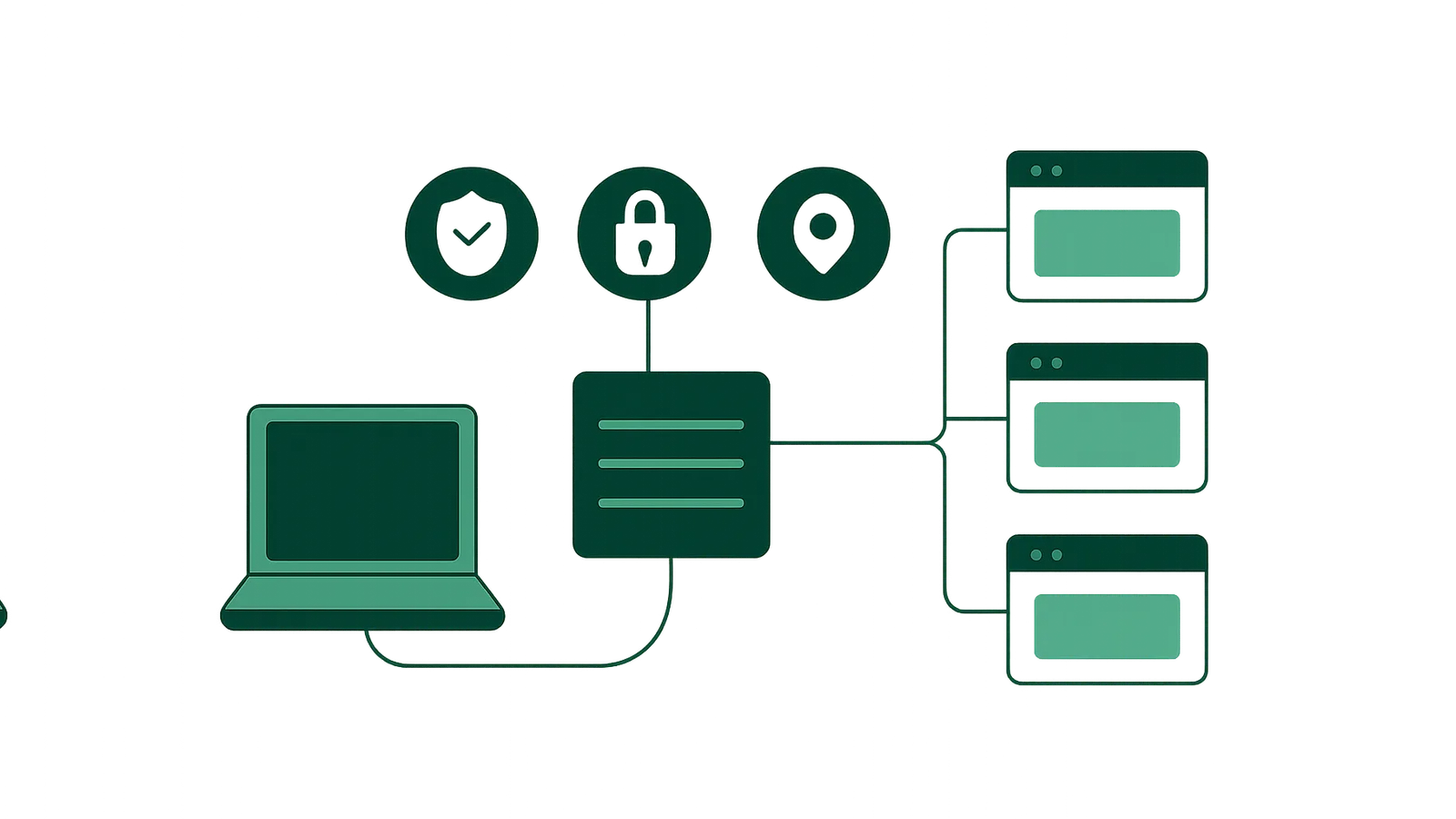
This guide explains what proxy servers are, how they work, the main types available and why developers and businesses use them. You will also find practical setup steps, a comparison of proxy types, their limitations and best practices for responsible use.
What is a proxy server?
A proxy server is a dedicated application or device that receives network requests from a client (such as your browser or application), relays those requests to the destination server (such as a website), and then forwards the server’s response back to the client. In doing so, the proxy server intermediates the connection, meaning the destination only sees the proxy’s IP address—not the end user’s.
Key points:
- Intermediary role: Sits between client and internet resources.
- IP masking: Hides the true IP address of the requester.
- Traffic control: Can filter, log, or modify requests and responses.
- Network boundary: Often used as a security or privacy layer.
How does a proxy server work?
The basic operation of a proxy server involves several steps:
- Client request: Your device (client) sends a network request (e.g., loading a website) to the proxy server.
- Proxy processing: The proxy server receives the request. Depending on its configuration, it may log, filter, or modify the request.
- Forwarding: The proxy server makes the same request to the destination server, using its own IP address instead of yours.
- Response handling: The destination server replies to the proxy.
- Relay to client: The proxy receives the response, optionally processes it, and then sends it back to your device.
This sequence means the destination never interacts directly with your device, only with the proxy server.
What Information Does the Proxy See and Control?
- Source and destination IPs
- Requested URLs or data
- Headers and sometimes payload
Depending on configuration, proxies can anonymize, rewrite, block, or cache data.
Types of proxy servers
Proxy servers come in several forms, each suited to different use cases and technical requirements. The most common types include:
1. Forward Proxy (Standard Proxy)
- Positioned between clients and the open internet.
- Used to mask client IPs, filter outbound requests, or enforce policies.
- Examples: residential, mobile, datacenter proxies.
2. Reverse Proxy
- Sits in front of web servers, handling inbound traffic from the internet.
- Used for load balancing, security, or caching for backend infrastructure.
- Not typically a user-level tool.
3. Transparent Proxy
- Forwards requests without modifying them or hiding the client’s IP.
- Often used in organizational networks for monitoring or filtering.
4. Anonymous Proxy
- Hides the client’s IP address from the destination.
- Used for privacy and masking.
5. High Anonymity (Elite) Proxy
- Removes all identifying headers and does not reveal itself as a proxy.
6. Residential, Mobile, and Datacenter Proxies
- Residential: Use IP addresses assigned to real residential ISPs. Appear as ordinary home users.
- Mobile: Use IPs from mobile carriers (4G/5G). Trusted by platforms as cellular users.
- Datacenter: Use IPs from data centers. Fast, stable, but sometimes detected as non-residential.
For an in-depth comparison, see Residential vs Mobile Proxies.
Why use a proxy server?
Proxy servers offer a range of advantages for businesses, developers, and privacy-minded users. The main benefits include:
1. Privacy and Anonymity
- Hide your real IP address from websites and services.
- Prevent tracking or profiling based on your network location.
2. Geo-Targeting and Local Testing
- Access content as if you are in a different country, city, or even on a specific ISP or mobile carrier.
- Useful for ad verification, market research, and localized QA.
3. Security and Access Control
- Filter or block unwanted content or requests at the network edge.
- Protect internal systems by isolating them behind a proxy.
- Log and audit outbound or inbound connections.
4. Traffic Management and Load Balancing
- Distribute requests across multiple servers or IPs.
- Manage bandwidth usage and prevent overload.
5. Data Collection and Automation
- Collect public web data (e.g. prices, listings, reviews) at scale while respecting site terms and applicable law.
- Avoid rate-limiting by distributing requests across many IPs (within legal and ethical boundaries).
6. Bypassing Simple Network Restrictions
- Access public content otherwise blocked by regional or workplace firewalls, when compliant with all terms.
Note: Proxies must always be used for lawful collection of public data and within each site’s terms of service. Activities such as credential stuffing, spam, or circumventing bans are prohibited and off-brand.
Common proxy server use cases
Here are examples of legitimate, high-value proxy use cases:
- Ad Verification: Checking how ads are served in different regions or on different devices.
- Market and Price Research: Monitoring competitor prices, listings, or promotions in various locations.
- Localized QA: Testing how websites appear and function from different geographies or ISPs.
- Public Data Collection: Gathering open data (e.g., travel offers, hotel rates, e-commerce listings) at scale.
- Brand Monitoring: Tracking public mentions or unauthorized use across regions.
- Network Security: Enforcing access controls or filtering at the network edge.
How to set up a proxy server connection
Setting up a proxy server for personal or business use can be straightforward. Here’s how to get started with a typical forward proxy, such as those offered by Nefo.
Step 1: Choose the Right Proxy Type
- Residential proxies: Best for high-trust, geo-targeted, or stealthy data collection.
- Mobile proxies: Required for mobile-only content or carrier-grade trust.
- Datacenter proxies: Ideal for speed and cost efficiency.
- Static IP proxies: Needed when you must keep a single, dedicated IP for a long period.
- IP Vault: For holding a residential/mobile IP long-term.
Step 2: Purchase or Obtain Proxy Credentials
- Register with a provider like Nefo.
- Choose your product (residential, mobile, datacenter, static IP).
- Configure targeting (country, city, carrier, etc.) and purchase the required amount (per GB or per port/duration).
Step 3: Configure Your Device or Application
- Obtain the proxy server address, port, and authentication credentials.
- For browser use: enter the proxy details in your browser’s network settings.
- For applications or scripts: configure HTTP, HTTPS, or SOCKS5 proxy settings as required.
- For bulk or automated use: most providers (including Nefo) support programmatic access and API integration.
Step 4: Test Your Configuration
- Visit a site like ip.nefo.net to confirm your traffic is routing through the proxy.
- Check for correct geo-location and IP type.
Step 5: Monitor and Manage Usage
- Track bandwidth or port usage via your provider dashboard.
- Rotate or swap IPs as needed (for rotating or sticky sessions).
Tip: For detailed setup instructions for each proxy type, see the Nefo Documentation.
Proxy types compared
| Proxy Type | How It Works | Best Use Cases | Billing Model | Key Advantages | Limitations |
|---|---|---|---|---|---|
| Residential | Routes through home ISP IPs | Ad verification, public data, QA | Per GB, no expiry | High trust, geo/city targeting | Higher cost, slower than datacenter |
| Mobile (4G/5G) | Routes through carrier IPs | Mobile-only content, high-trust | Per port/time, daily bandwidth | Carrier trust, location/carrier switching | Limited countries, daily bandwidth cap |
| Datacenter | Routes through data center IPs | Speed, bulk scraping, automation | Per GB, no expiry | Fast, affordable, broad targeting | May be flagged as non-residential |
| Static IP | Dedicated datacenter IP | One IP for long-term use | Per IP/time, unmetered | Fixed IP, private, stable | Not residential/mobile, some blocks |
| IP Vault | Kept residential/mobile IP | Hold one address for weeks | Per IP/bandwidth | Long-term, residential/mobile trust | Bandwidth allowance per IP |
For full pricing and targeting details, see Nefo Pricing.
Limitations and when not to use a proxy
While proxy servers are powerful tools, they are not a universal solution. Consider these limitations:
- Not a privacy panacea: Proxies mask your IP, but do not encrypt traffic like a VPN. Sensitive data is still visible to the proxy provider and, if HTTP is used, to the network.
- Potential for detection: Some websites can detect and block certain proxy types (especially datacenter IPs).
- Legal and compliance boundaries: Only use proxies for lawful collection of public data and within each service’s terms. Activities such as spam, credential abuse, or unauthorized account creation are prohibited.
- Performance trade-offs: Residential and mobile proxies may have slower response times than datacenter or static IPs.
- Bandwidth or usage limits: All proxies have usage caps (per GB, per day, or per port). There is no such thing as unlimited bandwidth or connections.
- Not for permanent access: IPs may change (rotating sessions) or become unavailable due to network churn or ISP policies.
- IPv6 acceptance: Many destinations do not support IPv6; always check compatibility before choosing a static IPv6 proxy.
When not to use a proxy:
- When you require end-to-end encryption for all traffic (use a VPN instead).
- If your use case requires guaranteed, permanent IP addresses (not possible with rotating or shared proxies).
- For activities that violate site terms, local laws, or ethical standards.
Best practices for responsible proxy use
- Stay within the law and site terms: Only collect public data and respect robots.txt and site restrictions.
- Monitor usage: Track bandwidth, session counts, and port limits to avoid interruptions.
- Rotate IPs responsibly: Use sticky sessions when necessary, but avoid overloading any one IP.
- Don’t share credentials: Keep your proxy credentials secure to prevent abuse.
- Test before scaling: Always validate your setup on a small scale before running large tasks.
- Document your configuration: Maintain records of proxy types, targets, and usage patterns for troubleshooting and compliance.
- Review logs and alerts: Use provider dashboards to spot anomalies and optimize your workflow.
For more tips, see the Nefo FAQ.
Proxy types available at Nefo
Nefo offers the main proxy types on one balance, with usage-based pricing:
- [Residential proxies](/residential-proxies) in 227 countries and territories, 22,417 cities and 14,252 ISPs, with HTTP, HTTPS and SOCKS5. From $0.53/GB; the smallest order is 5 GB for $4.50, and bandwidth never expires. Sticky sessions last up to 24 hours.
- [Mobile proxies](/mobile-proxies) (4G/5G) with carrier IPs: Economy $30 for 30 days (US only), Basic $40 (9 countries) and Turbo $60 (6 countries). Each port includes free location changes and 15 GB/day.
- [Datacenter proxies](/datacenter-proxies) in 75 countries, from $0.29/GB at volume (1 GB is $0.66).
- [Static IP proxies](/static-ip-proxies): dedicated IPv4 from $1.17 for 7 days and IPv6 from $0.72 for 30 days, with unlimited bandwidth.
- [IP Vault](/ip-vault) to keep residential IPs that work.
Ready to get started? View pricing or create an account.
Frequently asked questions
A proxy server is a middleman between your device and the internet. It forwards your requests to websites and returns their responses, so the website sees the proxy's IP address instead of yours.
To collect public data across many IPs, check prices and ads by location, test websites from other countries and avoid IP-based rate limits. See the proxy use cases.
Enter the proxy host, port, username and password in your client's proxy settings or code, choose HTTP or SOCKS5 and send a test request to confirm the IP changed. The integration guides include code.
Residential proxies use home ISP IPs, mobile proxies use carrier IPs and datacenter proxies use server IPs, which are faster and cheaper but easier to detect. See residential vs datacenter.
Yes, with static products. Nefo static IP proxies are dedicated and have unlimited bandwidth, and per-GB bandwidth on rotating products never expires. No IP is guaranteed forever.
Proxies are legal tools. What matters is how you use them: follow each site's terms and applicable law and collect only public data. See safe and acceptable use.
Use a VPN to encrypt and route all device traffic for privacy. Use a proxy to route specific app requests through chosen IPs and locations, especially for data collection. See proxy vs VPN.